Type Chinese. It goes out in their language
automatically
In WhatsApp Web and KakaoTalk, type Chinese in the message box and press Enter. The tool translates first, then sends — no window switching, no copy-pasting, and no second click to send it yourself. Incoming messages can be read in Chinese too.
If translation fails, your Chinese is never sent
Lost connection, timeout, model error, malformed output — any one of these and the tool restores your original text, sends nothing, and never retries silently. KakaoTalk gets a second, mechanical safeguard: you set its send key to Ctrl+Enter, so a plain Enter only inserts a line break. Even if the tool itself dies, your Chinese cannot go out.
This is the most important design decision in the product. Everything else ranks below it.
What it does
Every one of them serves the same goal: make cross-language sales conversations faster without getting them wrong.
Type Chinese, sent as their language
Type Chinese in the chat box and press Enter. The tool translates into the language you set for that customer and sends it — what they receive reads like a native wrote it.
Context-aware, tone-adjustable
Each translation carries the last few turns of the conversation, so pronouns, ellipsis and jargon land correctly. Language and tone can be pinned per contact.
Learn more →Reply suggestions
Stuck on a reply? One click gives you 3 Chinese drafts. Pick one and it goes into the message box — you decide whether to send.
Learn more →Translate a screenshot
Foreign text inside images — quotes, shipping labels, product pages — select an area and get both the original text and the translation.
Learn more →Their messages, in Chinese
Incoming messages are translated to Chinese next to the original. On KakaoTalk the chat text cannot be read by the system, so you select a message and press Ctrl+C — the translation appears in a floating bar at the bottom right.
Multiple platforms and accounts
WhatsApp Web supports several accounts in parallel; KakaoTalk runs against the desktop client; more chat sites are supported through rules pushed from the server, with no client update needed.
Learn more →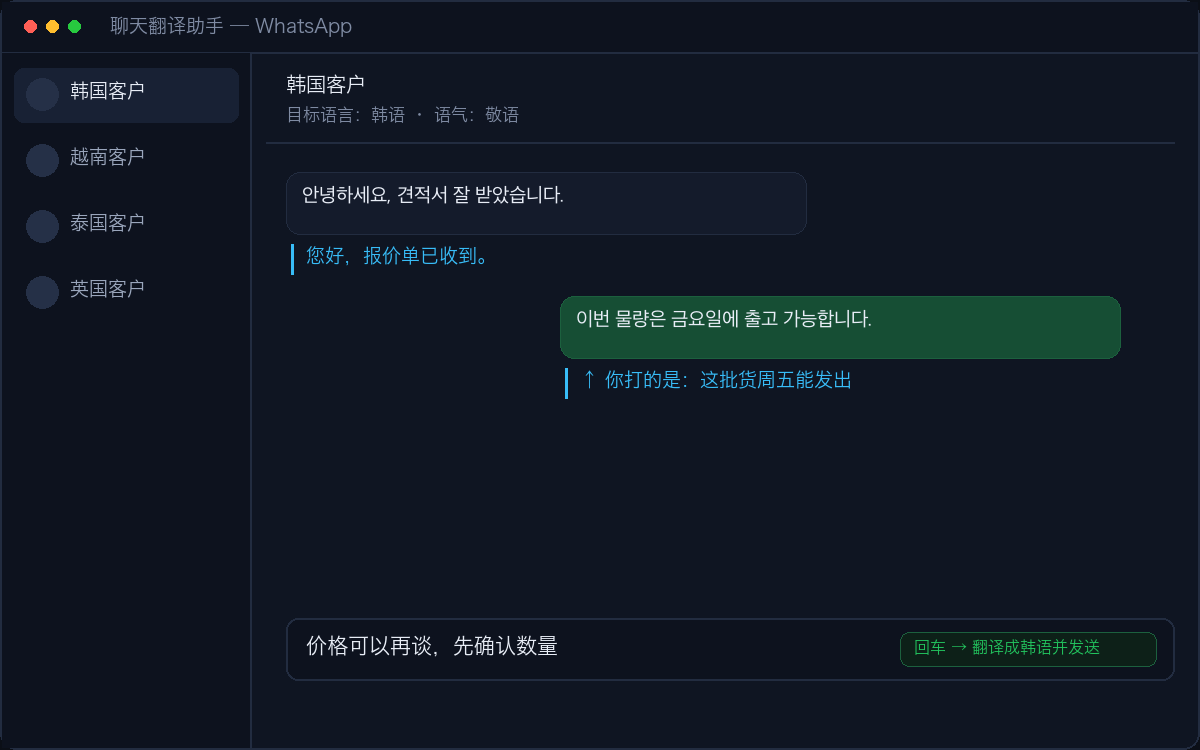
Three steps
Install
Download and install. If Windows shows a SmartScreen prompt on first run, click "More info" then "Run anyway".
Create an account
Sign up inside the app and your 3-day free trial starts immediately. Translation is provided by the platform — no AI key to configure.
Just type Chinese
Type Chinese and press Enter, the way you normally would. For KakaoTalk, set its send method to Ctrl+Enter first.
What it costs
- 100,000 characters of translation per month (both directions count)
- Translation is provided by the platform — no AI key to configure
- Works with WhatsApp Web and KakaoTalk desktop
What we don’t do
The tool types and sends inside your own real account, on your behalf. No mass messaging, no account farming, no touching platform protocols, none of the multi-account spoofing tricks. Being safe for people running a legitimate export business is the premise.
Download
The installer is not code-signed yet, so Windows SmartScreen steps in. Click "More info" then "Run anyway". That is a certificate matter, not a sign that anything is wrong with the file.